In an event-driven architecture, requirements for a flexible, reliable schema contract between producer and consumer application is required. Using protocol buffers allows for an extensible mechanism for serializing structured data. You are able to define the contract once and use the generated source code to write and read data using the language of your choice. In this article, I’ll discuss the steps to push a serialized protobuf message into kafka and a way to verify that by reading the message from kafka into a console
Short intro to Protobuf
You can think of protobuf like a structured schema for your internal services to use for inter-service communication. An example of a .proto file will look like this:
enum PhoneType {
  MOBILE = 0;
  HOME = 1;
  WORK = 2;
}

message PhoneNumber {
  string number = 1;
  PhoneType type = 2;
}

message Person {
  string name = 1;
  int32 id = 2;
  string email = 3;
  repeated PhoneNumber phones = 4;
  google.protobuf.Timestamp last_updated = 5;
}
This structure is quite simple and easy to read. The snippet above defines the schema for Person data type that has
five fields. The numbers on the end of each field is to identify unique tag that field uses in binary encoding. You are required to provide a data type on each field and number them which aids in backward compatibility
Further guide on writing proto files can be found in the language guide.
Compiling
Now you have your .proto files, you will need to compile them into a language of your choice. Since I am using golang. I will use the go-protocol-buffers(go install google.golang.org/protobuf/cmd/protoc-gen-go) on top of the Protocol Buffers library(brew install protobuf on Mac).
Now you can run your compiler with command protoc -I=$SRC_DIR --go_out=$DST_DIR $SRC_DIR/Person.proto. This command is divided into 3 section
-I=$SRC_DIR-> location of source directory--go-out=$DST_DIR-> location of where compiled stub codes will be generated$SRC_DIR/Person.proto-> location of the proto file in the source directory
Setup Kafka
Ensure you have kafka installed on your system. Start up your local kafka zookeeper and server
Setup repository/producer
I have created a small terminal golang application to represent the producer side of this flow. This can be found here. In the repository, I have created the proto file as per the snippet above in the /protos directory. Generated stub golang files are also in the /generatedProtos/person directory. You can specify the broker and topic name in the application.yml. Right now, running the application will generate a random Person message and push into kafka

Note: An improvement to be made is make the kafka producer to accept generic proto message.
Setup consumer
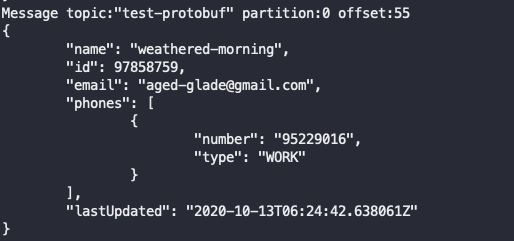
For the consumer, we are going to use a nifty tool to read protobuf encoded messages from a kafka topic and prints its decoded JSON to console. So it visually easy to see that you encoded protobuf messages are actually going into your specified brokers.
Command used to run this tool is as follows: kafka-protobuf-console-consumer -t test-protobuf -b localhost:9092 --proto-dir protos --file /Person.proto --message example.PersonMessage --from-beginning --pretty
-tbeing the topic name. Ensure the topic name specified here is the same as the topic in the repository-bthe broker. for now localhost--proto-dirlocation of proto directory--filelocation of.protofile in the proto directory--messagename of the package and message