Notes on kubernetes
Containers-Docker/Container Orchestration
Kubernets at a high level
-
overview of containers(recap)
- most popular container technology is docker
- containers isolated environments, they can have their applcations, processes, services sharing the same underlying kernel of the docker host. For example, you can run a debian, or centos containers on a linux ubuntu os docker host. You are unable to run a windows based containers on a docker host with linux os on it
- main purpose is to containerize applications and to ship and run them
-
container orchestration
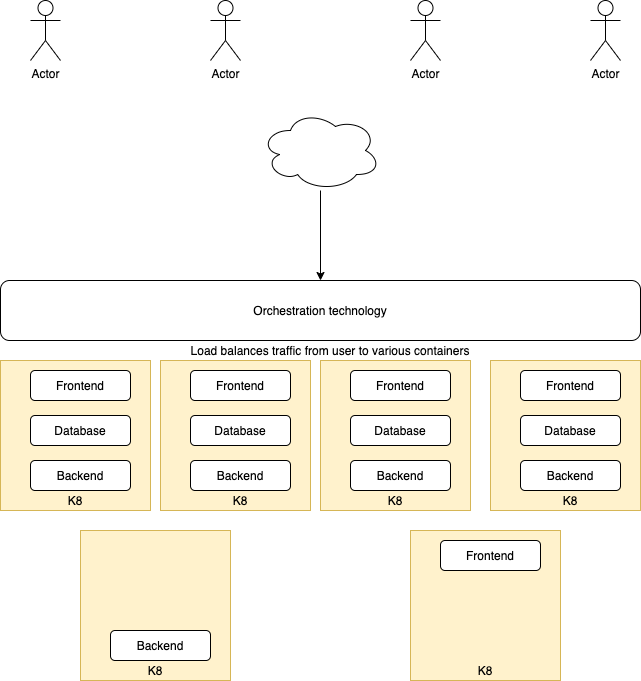
- Now that we have a bunch of containers running (application, database, messaging, another application), question comes on how do we scale up/down, increase reliability, lesser downtime for our application
- To enable such functionalities, we need a underlying platform with a set of resources and capabilities. The platform needs to orchestrate the connectivity between the containers and automatically scale up or down based on the load. This whole process of automatically deploying and managing containers in a clustered environment is called container orchestration
-
there are a couple of orchestration technologies on the market
- Docker swarm
- Kubernetes
- MESOS
-
Some advantages of using such orchestration technologies are
- applcations are now highly available as hardware failure will be saved by having multiple instances of your application running on different nodes
- user traffic is load balanced across the various containers
- when demand increases, we can deploy moe instances of the containers instantly
- scale nodes up and down easily
- This is all down using a set of declarative object configuration files
Kubernetes architecture/terminology
Nodes
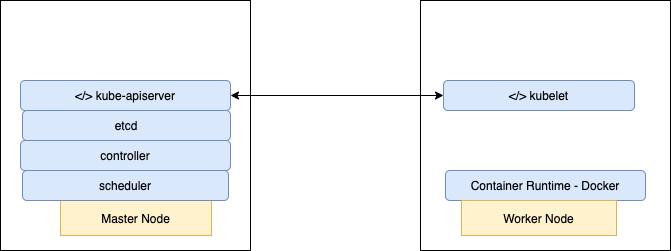
- a node is a machine physical or virtual machine on where k8 is installed. A node/minion is a
workermachine and that is where containers will be launched by k8 - we will need more than 1 node. This is call a
cluster - Responsibility of managing and monitoring a cluster is the
masternode which also has k8 installed on it and is configured as master
Api server
- the api server acts a front end for k8. THe users, management devices, cli all talk to the api server to interact with kubernetes cluster
etcd
- etcd is a key store. It is a reliable key store used by k8 to sore all data used to manage the cluster
- It stores all the information on the connection between nodes and masters in the cluster
- Also incharge of implementing locks within the cluster to ensure there are no conflicts between the master.
scheduler
- responsible for distributing work or containers across multiple nodes. It looks for newly created nodes and assign them containers
controller
- brain of the architecture. responsible for noticing and responding when nodes, containers or end points goes down
- make decisions to bring up new nodes when such scenarios happens
container runtime
- underlying software that is used to run containers
- this is docker
kubelet
- agent that runs on each node in the cluster
- agent is responsible for making sure that the containers are running on the nodes as expected
kubectl run hello-minikubecommand is used to deploy an application on the clusterkubectl cluster-infocommand is used to view information about the clusterkubectl get nodescommand is used to get information on the nodes in the clusterkubectl get nodes -o widecommand is used to get more information on all nodes in the cluster
Theory understanding
- What is a worker machine in Kubernetes known as - Node or Minion
- A node is kubernetes can only be a physical machine and can never be a virtual machine - False
- Multiple nodes together form a - Cluster
- Which of the following processes runs on Kubernetes master node - Kube-apiserver
- Which of the following is a distributed reliable key-value store used by kubernetes to store all data used to manage the cluster - etcd
- Which of the following services is responsible for distributing work or containers across multiple nodes - scheduler
- Which of the underlying framework is responsible for running application in containers like docker - container runtime
- Which is the command line utility used to manage a kubernetes cluster - kubectl
Setting up K8
-
Setup locally on mac/vm using
minikube/microk8s- install kubectl
https://kubernetes.io/docs/tasks/tools/install-kubectl/ - install minikube
https://minikube.sigs.k8s.io/docs/start/ - you should be able to run kubectl commands on the minikube vm upon installing both components
- install kubectl
-
There is also an admin tool call
kubeadmwhich is use to bootstrap and manage production grid coordinates clusters -
Can also setup k8 clusters on the cloud using
google container engine(gce)on gcp
Working with YAML
- space indented. equal number of spaces. don’t use tabs
- dictionary is unordered
- list is ordered
- any line beginning with hash is a comment
key-value pair
item: item1
item: item2

Array
Items:
 - item1
 - item2

Dictionary/Map
Items:
 item1: 34
 item2: 23


Key value/dictionary/lists
Fruits:
 - Apple:
    Cal: 105
    Fat: 33
    Carbs: 33
 - Grape:
    Cal: 33
    Fat: 2
    Carbs: 2
Dictionary (Objects)
Color: Blue Model: name: Toyota year: 1993 Transmisison: Auto
List (Arrays)
- blue
- red
- green
List of dictionary (Array of objects)
-
Color: Blue Model: Name: Toyota Model: 1992 Transmission: auto Price: 3000
-
Color: Red Model: Name: Toyota Model: 1993 Transmission: auto Price: 5000
K8 concepts - PODS | ReplicaSets | Deployment | Services
PODS
- Pods are the smallest objects that Kubernetes can create that encapsulates a running container
- Main aim is to deploy our application in the form of containers on a set of machines(virtual/physical) that are configured as worker nodes in a cluster
- However, kubernetes does not deploy containers directly on the worker nodes, the containers are encapsulated into a kubernetes object known as PODs. A POD is a single instance of an application
- An example is a single node in Kubernetes cluster with a single instance of an application running in a single docker container encapsulated in a pod
- If we need to add additional instances of the application to share the load for more users, do we bring up a new container instance within the same pod?, The answer is no
- We should instead create a new pod with a new instance of the same application. We would then have 2 instances of the application running on 2 separate PODs on the same Kubernetes cluster
- If the user base increases further and the current node has reached its max capacity, we should then deploy additional pods on a new node in the cluster
- Multi container pods are pods that have more than 1 containers running in a pod. This is common when we want to group an applicaiton with a helper container in the same pod
- These two containers can also communicate with each other directly as they are part of the same pod.
kubectl run nginx --image nginx-> creates a pod automatically and deploys an instance of nginx docker image. Default image repository is at docker registry- alternate way of creating pods
kubectl run <podname> --image=<image_name> kubectl get pods-> get list of podskubectl describe pod nginxkubectl get pods -o wide-> get additional information on all pods
YAML in Kubernetes
- pod-definition.yml
apiVersion: v1
kind: Pod
metadata: (information on pod. a dictionary)
  name: myapp-pod (name of pod)
  labels: (dictionary within the metadata dictionary. any kinds of fields)
    app: myapp
    type: front-end
spec: (spec is a dictionary)
  containers: (is a list/array of dictionary)
    - name: nginx-container
      image: nginx
-
To create a pod with the definition file
kubectl create -f pod-definition.yml
-
Update a yaml definition file and run this command to update pod configs
kubectl apply -f pod-definition.yml-> apply should be used on resource created by either kubectl create or kubectl apply
-
We can also directly edit a pod config and this will open up a vi editor
kubectl edit <pod_name>
-
Get list of pods
kubectl get pods
-
Get more description on a pod
kubectl describe pod <pod_name>kubectl get pods -o wide
-
Creating a pod dry run and insert to a pod definition file
kubectl run redis --image=redis123 --dry-run=client -o yaml > pod.yaml
-
Print out logs of a pod
kubectl logs [pod_name]
-
Tell k8 to process the config
kubectl apply -f [yaml file]
-
Execute the given command in a running pod
kubectl exec -it [pod_name] [command]
-
Delete a pod based on config
kubectl delete -f [yaml file]
-
Delte a resource in k8
kubectl delete [resource name] [pod name]
Deployments
-
To manage multiple pods in deployment config file
-
List all running deployments
kubectl get deployments
-
Print out details about a specific deployment
kubectl describe deployment [depl name]
-
Create a deployment out of a config file
kubectl apply -f [config file name]
-
Delete a deployment
kubectl delete deployment [depl name]
-
Updating deployments method 1
- make change to your project code
- rebuild image, specifying a new image version
- in the deployment config file, update the version of the image
- run command
kubectl apply -f [depl file name]
-
Updating deployments method 2 (preferred)
- the deployment config file must be using the latest tag in the pod spec section
- make update to your code
- build the image
- push image to docker hub
- run the command
kubectl rollout restart deployment [depl_name]
To run locally build docker images in K8
- run
minikube docker-envin terminal - follow instructions provided and run command
eval $(minikube -p minikube docker-env) - rebuild image so that it’s installed in the minikube registry instead of the local one
Networking in K8
Types of services
- cluster IP
- sets up an easy to remember URL to access a pod
- only exposes pods in the cluster
- node port
- makes a pod accessible form outside the cluster. Usually only used for dev purposes
- load balancer
- makes a pod accessible from outside the cluster. This is the right way to expose a pod to the outside world
- external name
- redirects an in-cluster request to a CNAME url
Example of a nodeport service spec
apiVersion: v1
kind: Service
metadata:
  name: posts-srv
spec:
  type: NodePort
  selector:
    app: posts
  ports:
    - name: posts
      protocol: TCP
      port: 4000 -> is the assigned port for the node port service
      targetPort: 4000 -> is the assigned port for the pod containing the container running the image
-
Getting all services in cluster
kubectl get services
-
Getting description of service and accessing from outside the cluster
kubectl describe service [service-name]- In the NodePort attribute, notice another port in the range of 30000 to 32000. This is the port that we can acccess from outside the cluster
- To access the service from outside the cluster, we need the ip if we are using minikube. Use
minikube ip - go to browser, curl or postman
192.168.99.103:31954/posts
Ingress controller && Load Balancer
-
Load balancer service - Tells kubernetes to reach out to its provider(aws, gc, azure) and provision a load balancer(lives outside the cluster). Get traffic into our cluster
-
Ingress controller - a pod with a set of routing rules to distribute traffic to other services
-
open source project - ingress-nginx
K8 Management using kubectl K8 Definition files using YAML K8 on cloud - AWS | GCP